Of course! This is a very common and powerful technique in the Java world. Let's break down how to use JNI (Java Native Interface) to call C code from a Linux C environment.
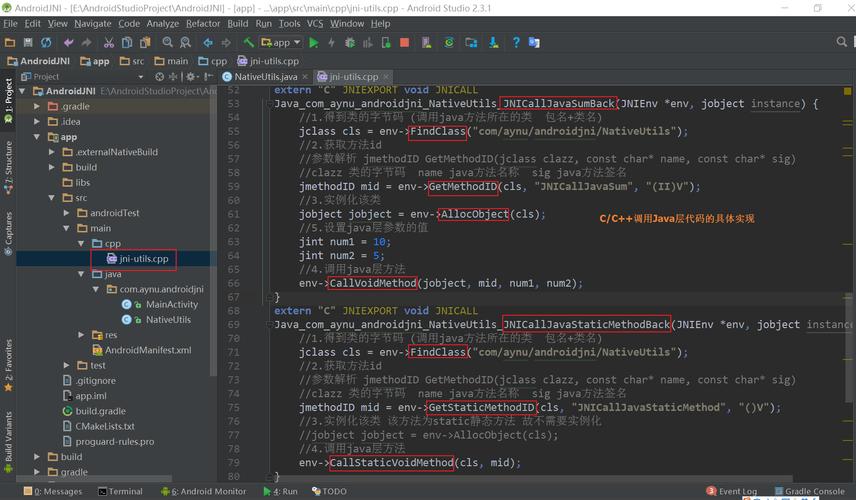
We'll cover:
- What is JNI? - A quick conceptual overview.
- The Workflow - The step-by-step process of creating a JNI project.
- A Complete "Hello, World!" Example - A simple, runnable example to get you started.
- Passing Data - How to pass strings and integers between Java and C.
- Building and Running - The essential
gccandjavacommands on Linux. - Troubleshooting - Common pitfalls and solutions.
What is JNI?
The Java Native Interface (JNI) is a framework that allows Java code running in the Java Virtual Machine (JVM) to call and be called by native applications and libraries written in other languages like C, C++, and assembly.
Why use it?
- Performance: To leverage highly optimized C/C++ libraries for computationally intensive tasks (e.g., math libraries, physics engines).
- Hardware/OS Interaction: To interact with hardware or operating system features that are not accessible through the standard Java API (e.g., specific I/O ports, kernel-level features).
- Legacy Code: To reuse existing, legacy C/C++ codebases without rewriting them in Java.
The Big Picture:
Java App -> JVM -> JNI Bridge -> Native C Library -> Linux Kernel/Hardware

The Workflow
Here is the standard process for creating a JNI application:
- Write the Java Code: Create a Java class that declares the native methods you want to implement in C. You also need a special
staticblock to load the native library. - Compile the Java Code: Compile your
.javafile into a.classfile. - Generate the Header File: Use the
javahtool (orjavac -hin modern Java) on the compiled.classfile to create a C header file (.h). This header file contains the C function signatures that you must implement. - Write the C Code: Implement the native functions in a C source file (
.c), including the necessary JNI headers. - Compile the C Code: Compile your C source file into a shared object library (
.sofile) that the JVM can load. - Run the Java Application: Execute your Java code, making sure the JVM can find your newly created
.solibrary.
A Complete "Hello, World!" Example
Let's create a simple example where a Java application calls a C function that prints "Hello from C!" to the console.
Step 1: Write the Java Code
Create a file named HelloJNI.java.
// HelloJNI.java
public class HelloJNI {
    // Declare the native method. The implementation will be in C.
    private native void sayHello();
    // A static block to load the native library.
    // The name "libhellojni" will correspond to "libhellojni.so".
    static {
        System.loadLibrary("hellojni");
    }
    public static void main(String[] args) {
        new HelloJNI().sayHello();
    }
}
Key Points:
private native void sayHello();: Thenativekeyword tells the compiler that this method's implementation is not in Java.static { System.loadLibrary("hellojni"); }: This block runs when the class is loaded. It tells the JVM to load the shared library namedlibhellojni.so. Thelibprefix and.soextension are standard on Linux, so you just provide the middle part.
Step 2: Compile the Java Code
Open your terminal and run the Java compiler:
javac HelloJNI.java
This will produce a HelloJNI.class file.
Step 3: Generate the C Header File
Now, use javah to generate the C header. (For Java 9+, use javac -h).
# The -jni flag is the default, but it's good to be explicit
javac -h . HelloJNI.java
-h .: Specifies that the header file should be generated in the current directory.
This command will create a file named HelloJNI.h. Do not edit this file! It's your contract.
Step 4: Examine and Write the C Code
First, let's look at the generated HelloJNI.h:
/* DO NOT EDIT THIS FILE - it is machine generated */
#include <jni.h>
/* Header for class HelloJNI */
#ifndef _Included_HelloJNI
#define _Included_HelloJNI
#ifdef __cplusplus
extern "C" {
#endif
/*
 * Class:     HelloJNI
 * Method:    sayHello
 * Signature: ()V
 */
JNIEXPORT void JNICALL Java_HelloJNI_sayHello
  (JNIEnv *, jobject);
#ifdef __cplusplus
}
#endif
#endif
Key Points in the Header:
JNIEXPORT void JNICALL: These are macros that define the function's calling convention and export status. They are essential.Java_HelloJNI_sayHello: The C function name is generated by concatenatingJava_, the package name (if any), the class name, and the method name. Since we have no package, it's justJava_HelloJNI_sayHello.(JNIEnv *, jobject): These are the first two arguments to every JNI method.JNIEnv *: A pointer to the JNI "environment". You use this pointer to call other JNI functions (e.g., to create objects, throw exceptions, access fields).jobject: A reference to theHelloJNIJava object instance that called the native method. Forstaticmethods, this would be ajobject(a reference to thejava.lang.Classobject).
Now, create the C implementation file, HelloJNI.c:
#include <stdio.h>
#include "HelloJNI.h" // Include the generated header
// Implement the native method
JNIEXPORT void JNICALL Java_HelloJNI_sayHello(JNIEnv *env, jobject thisObj) {
    printf("Hello from C!\n");
}
This is straightforward: we include the header and implement the function with the exact signature from the header.
Step 5: Compile the C Code into a Shared Library
This is the most critical step on Linux. You need to compile your C code into a shared object (.so) file. Use gcc for this.
gcc -I${JAVA_HOME}/include -I${JAVA_HOME}/include/linux -fPIC -shared -o libhellojni.so HelloJNI.c
Let's break down this command:
gcc: The GNU C Compiler.-I${JAVA_HOME}/include: Tells the compiler where to find the main JNI headers (jni.h). You must set theJAVA_HOMEenvironment variable to your JDK installation path (e.g.,/usr/lib/jvm/java-11-openjdk-amd64/).-I${JAVA_HOME}/include/linux: Specifies the platform-specific JNI headers (e.g.,jni_md.h).-fPIC: Very important! It generates Position-Independent Code, which is required for shared libraries.-shared: Tells the compiler to produce a shared library (.sofile).-o libhellojni.so: Specifies the name of the output file. Thelibprefix and.soextension are standard.HelloJNI.c: Your C source file.
Step 6: Run the Java Application
Now you're ready to run it. You need to tell the Java Virtual Machine where to find your .so library using the -Djava.library.path option.
java -Djava.library path=. HelloJNI
Expected Output:
Hello from C!Passing Data Between Java and C
Let's extend our example to pass a string from Java to C and an integer back.
Updated Java Code (`HelloJNI.java``)
public class HelloJNI {
    // ... sayHello method from before ...
    // New native method to pass data
    private native int add(int a, int b);
    private native String sayHelloTo(String name);
    static {
        System.loadLibrary("hellojni");
    }
    public static void main(String[] args) {
        HelloJNI myApp = new HelloJNI();
        myApp.sayHello();
        int sum = myApp.add(10, 25);
        System.out.println("10 + 25 = " + sum);
        String greeting = myApp.sayHelloTo("JNI User");
        System.out.println("Message from C: " + greeting);
    }
}
Updated C Code (HelloJNI.c)
#include <stdio.h>
#include "HelloJNI.h"
// ... Java_HelloJNI_sayHello from before ...
// JNI method to add two integers
JNIEXPORT jint JNICALL Java_HelloJNI_add(JNIEnv *env, jobject thisObj, jint a, jint b) {
    printf("C: Received %d and %d\n", a, b);
    return a + b;
}
// JNI method to take a string and return a new one
JNIEXPORT jstring JNICALL Java_HelloJNI_sayHelloTo(JNIEnv *env, jobject thisObj, jstring name) {
    // 1. Get the C-style string from the Java String
    const char *c_name = (*env)->GetStringUTFChars(env, name, NULL);
    if (c_name == NULL) {
        return NULL; // OutOfMemoryError already thrown
    }
    printf("C: Received name '%s'\n", c_name);
    // 2. Create a new C string to return
    char *result_string = "Hello, ";
    char *full_greeting = malloc(strlen(result_string) + strlen(c_name) + 1);
    strcpy(full_greeting, result_string);
    strcat(full_greeting, c_name);
    // 3. Create a new Java String from the C string and return it
    jstring result = (*env)->NewStringUTF(env, full_greeting);
    // 4. Release the original Java string to avoid memory leak
    (*env)->ReleaseStringUTFChars(env, name, c_name);
    free(full_greeting);
    return result;
}
Key C Concepts:
- Basic Types:
intin Java maps tojintin C. The mapping is direct. - Strings: Java strings (
String) are objects. In JNI, they arejstring.GetStringUTFChars(): Converts ajstringto a UTF-8 encoded C-stylechar*. You must release it.NewStringUTF(): Creates a newjstringfrom a C-stylechar*.
- Memory Management: JNI functions that allocate memory or create objects can throw Java exceptions. You must check for errors and release resources you've acquired (like
GetStringUTFChars).
Compile and Run
Compile the updated C code:
gcc -I${JAVA_HOME}/include -I${JAVA_HOME}/include/linux -fPIC -shared -o libhellojni.so HelloJNI.c
Run the updated Java code:
java -Djava.library path=. HelloJNI
Expected Output:
Hello from C!
C: Received 10 and 25
10 + 25 = 35
C: Received name 'JNI User'
Message from C: Hello, JNI User
Troubleshooting
-
java.lang.UnsatisfiedLinkError: no hellojni in java.library.path- Cause: The JVM cannot find
libhellojni.so. - Solution:
- Make sure the file name is exactly
libhellojni.so. - Make sure you are using the correct
-Djava.library.path=argument, pointing to the directory containing the.sofile. - Verify that the library was compiled correctly with
ldd libhellojni.so. It should show dependencies onlibjvm.soand other standard libraries.
- Make sure the file name is exactly
- Cause: The JVM cannot find
-
ldd: libhellojni.so: not a dynamic executable- Cause: You forgot the
-sharedflag when compiling withgcc. - Solution: Re-run the
gcccommand with the-sharedflag.
- Cause: You forgot the
-
Segmentation fault (core dumped)- Cause: This is a classic C error. You are likely accessing a null pointer, dereferencing an invalid object, or corrupting memory. A common JNI mistake is not checking if a JNI call (like
GetStringUTFChars) returnedNULL(indicating anOutOfMemoryErrorwas thrown in Java). - Solution: Use a debugger like
gdbto inspect the core dump. Carefully review your C code for null pointer checks and proper memory management.
- Cause: This is a classic C error. You are likely accessing a null pointer, dereferencing an invalid object, or corrupting memory. A common JNI mistake is not checking if a JNI call (like
-
error: jni.h: No such file or directory- Cause: The
-Iflag forjavacorgccis incorrect, orJAVA_HOMEis not set properly. - Solution: Double-check that
echo $JAVA_HOMEoutputs the correct path to your JDK. Verify the path toincludeandinclude/linuxis correct.
- Cause: The