下面我将从最核心的 java.util.Properties 类开始,逐步讲解如何读取、写入、操作 .properties 文件,并提供最佳实践和注意事项。

核心概念:java.util.Properties 类
Properties 类是 Java 中专门用于处理属性文件的类,它继承自 Hashtable<Object, Object>,因此可以像 Map 一样使用 put(key, value) 和 get(key) 方法,但它提供了更便捷的方法来处理字符串类型的键值对:
setProperty(String key, String value): 设置属性,相当于put(key, value)。getProperty(String key): 获取属性,相当于get(key).toString()。getProperty(String key, String defaultValue): 获取属性,如果属性不存在,则返回默认值。list(PrintStream out): 将属性列表输出到指定的打印流,方便调试。store(OutputStream out, String comments): 将属性列表写入到输出流。load(InputStream in): 从输入流中加载属性列表。
创建和写入 Properties 文件
你可以通过两种方式创建 .properties 文件:
- 直接作为资源文件(推荐):在
src/main/resources目录下创建。 - 通过 Java 代码动态创建:在程序运行时生成。
作为项目资源文件(推荐)
这是最标准、最推荐的做法。
步骤 1:创建 config.properties 文件
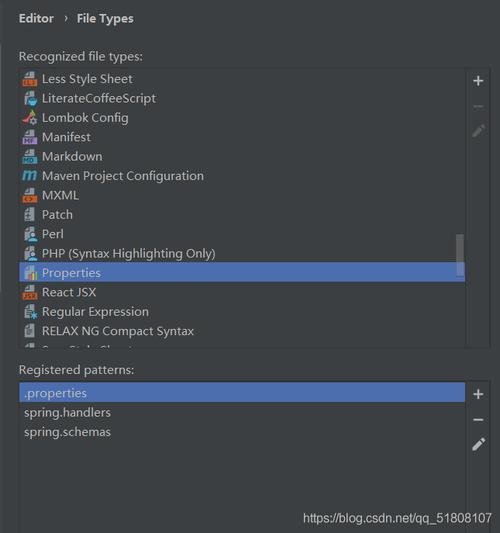
在你的项目中(对于 Maven 项目,在 src/main/resources 目录下),创建一个名为 config.properties 的文件。
config.properties
# Database Configuration
db.url=jdbc:mysql://localhost:3306/mydb
db.username=admin
db.password=secret123
db.pool.size=10
# Application Settings
app.name=MyCoolApp
app.version=1.0.0
feature.flag.newUI=true
步骤 2:通过 Java 代码读取该文件
我们将在下一节详细讲解如何读取。

通过 Java 代码动态创建和写入
如果你想根据程序逻辑动态生成一个属性文件,可以使用 Properties.store() 方法。
示例代码:
import java.io.FileOutputStream;
import java.io.IOException;
import java.io.OutputStream;
import java.util.Properties;
public class WritePropertiesFileExample {
    public static void main(String[] args) {
        // 1. 创建一个 Properties 对象
        Properties properties = new Properties();
        // 2. 使用 setProperty() 方法添加键值对
        properties.setProperty("server.host", "127.0.0.1");
        properties.setProperty("server.port", "8080");
        properties.setProperty("logging.level", "INFO");
        // 指定文件输出路径
        String filePath = "server_config.properties";
        // 3. 使用 try-with-resources 自动关闭输出流
        try (OutputStream output = new FileOutputStream(filePath)) {
            // 4. 将 properties 对象写入到文件中
            // 第二个参数是注释,会写入文件的开头,可以为 null
            properties.store(output, "Server Configuration File");
            System.out.println("Properties file created/updated successfully at: " + filePath);
        } catch (IOException e) {
            System.err.println("Error writing to properties file: " + e.getMessage());
            e.printStackTrace();
        }
    }
}
运行后,会生成一个 server_config.properties 文件:
#Server Configuration File
#Mon Nov 06 10:30:00 CST 2025
server.port=8080
logging.level=INFO
server.host=127.0.0.1
注意:
Properties.store()会自动对特殊字符(如空格、、、 等)进行转义,并按照一定的顺序(通常是字母顺序)保存。
读取 Properties 文件
读取 .properties 文件是更常见的场景,同样,推荐从资源目录读取,但也可以从文件系统路径读取。
从项目资源目录读取(推荐)
这种方式的好处是文件会被打包到最终的 JAR 或 WAR 文件中,使应用更具可移植性。
示例代码:
import java.io.IOException;
import java.io.InputStream;
import java.util.Properties;
public class ReadPropertiesFileExample {
    public static void main(String[] args) {
        // 1. 创建一个 Properties 对象
        Properties properties = new Properties();
        // 使用 try-with-resources 自动关闭输入流
        // getClass().getClassLoader().getResourceAsStream() 是从 classpath 根目录查找文件
        try (InputStream input = ReadPropertiesFileExample.class.getClassLoader().getResourceAsStream("config.properties")) {
            // 2. 检查输入流是否为空(文件是否存在)
            if (input == null) {
                System.out.println("Sorry, unable to find config.properties");
                return;
            }
            // 3. 加载属性文件
            properties.load(input);
            // 4. 获取并打印属性值
            String dbUrl = properties.getProperty("db.url");
            String username = properties.getProperty("db.username");
            String password = properties.getProperty("db.password");
            String appVersion = properties.getProperty("app.version", "1.0"); // 提供默认值
            System.out.println("Database URL: " + dbUrl);
            System.out.println("Username: " + username);
            System.out.println("Password: " + password); // 注意:生产环境不要直接打印密码
            System.out.println("App Version: " + appVersion);
            System.out.println("New UI Feature: " + properties.getProperty("feature.flag.newUI"));
        } catch (IOException e) {
            System.err.println("Error loading properties file: " + e.getMessage());
            e.printStackTrace();
        }
    }
}
从文件系统路径读取
如果你需要读取一个在项目之外的特定路径下的属性文件。
示例代码:
import java.io.FileInputStream;
import java.io.IOException;
import java.io.InputStream;
import java.util.Properties;
public class ReadPropertiesFromFileSystemExample {
    public static void main(String[] args) {
        Properties properties = new Properties();
        // 指定文件的绝对路径或相对路径
        String filePath = "C:/config/myapp.properties"; // 示例路径
        try (InputStream input = new FileInputStream(filePath)) {
            properties.load(input);
            // 使用属性...
            System.out.println("Loaded property from file: " + properties.getProperty("some.key"));
        } catch (IOException e) {
            System.err.println("Error loading properties from file: " + e.getMessage());
            e.printStackTrace();
        }
    }
}
高级主题与最佳实践
1 处理中文等非 ASCII 字符
.properties 文件默认是 ISO-8859-1 编码,直接写入中文会导致乱码。
解决方案:使用 java.nio.charset.StandardCharsets 进行编码转换。
写入中文示例:
Properties properties = new Properties();
properties.setProperty("welcome.message", "你好,世界!");
try (OutputStream output = new FileOutputStream("chinese_config.properties")) {
    // 关键:使用 UTF-8 编码
    properties.store(output, "Configuration with Chinese", StandardCharsets.UTF_8.name());
} catch (IOException e) {
    e.printStackTrace();
}
注意:
Properties.store(OutputStream, String)方法本身不直接支持指定编码,更通用的做法是先将内容写入StringWriter,然后再用指定的编码写入文件,或者,使用java.util.Properties的storeToXML()方法,它原生支持 UTF-8。
2 使用 XML 格式的属性文件
Java 也支持 XML 格式的属性文件,它天生支持 Unicode(UTF-8),无需担心编码问题。
创建 XML 属性文件:
Properties properties = new Properties();
properties.setProperty("key1", "value1");
properties.setProperty("key.中文", "你好");
try (OutputStream output = new FileOutputStream("config.xml")) {
    // 将属性存储为 XML 格式
    properties.storeToXML(output, "XML Configuration File");
} catch (IOException e) {
    e.printStackTrace();
}
生成的 config.xml 文件:
<?xml version="1.0" encoding="UTF-8" standalone="no"?>
<!DOCTYPE properties SYSTEM "http://java.sun.com/dtd/properties.dtd">
<properties>
<comment>XML Configuration File</comment>
<entry key="key.中文">你好</entry>
<entry key="key1">value1</entry>
</properties>
3 属性文件的继承与覆盖(最佳实践)
在实际项目中,通常会有不同环境的配置文件,
application.properties(默认配置)application-dev.properties(开发环境)application-prod.properties(生产环境)
你可以编写一个工具类来合并这些配置,后加载的配置会覆盖先加载的。
示例:合并配置
import java.io.IOException;
import java.io.InputStream;
import java.util.Properties;
public class PropertyLoader {
    public static Properties load(String... fileNames) {
        Properties result = new Properties();
        for (String fileName : fileNames) {
            try (InputStream input = PropertyLoader.class.getClassLoader().getResourceAsStream(fileName)) {
                if (input != null) {
                    Properties props = new Properties();
                    props.load(input);
                    // 将新加载的属性合并到结果中,相同的 key 会被覆盖
                    result.putAll(props);
                    System.out.println("Loaded properties from: " + fileName);
                }
            } catch (IOException e) {
                System.err.println("Could not load properties from " + fileName + ": " + e.getMessage());
            }
        }
        return result;
    }
    public static void main(String[] args) {
        // 先加载默认配置,再加载开发环境配置进行覆盖
        Properties config = PropertyLoader.load("application.properties", "application-dev.properties");
        System.out.println("Final DB URL: " + config.getProperty("db.url"));
        System.out.println("Final App Name: " + config.getProperty("app.name"));
    }
}
假设 application.properties 包含 db.url=localhost,而 application-dev.properties 包含 db.url=dev-db-server,那么最终 config.getProperty("db.url") 的结果将是 dev-db-server。
| 任务 | 核心方法 | 示例代码片段 |
|---|---|---|
| 创建对象 | new Properties() |
Properties props = new Properties(); |
| 添加/设置属性 | setProperty(key, value) |
props.setProperty("user", "admin"); |
| 获取属性 | getProperty(key) |
String user = props.getProperty("user"); |
| 获取属性(带默认值) | getProperty(key, defaultValue) |
String timeout = props.getProperty("timeout", "30"); |
| 写入到文件 | store(OutputStream, comments) |
props.store(new FileOutputStream("file.properties"), "Comment"); |
| 从文件读取 | load(InputStream) |
props.load(new FileInputStream("file.properties")); |
| 从资源读取 | getResourceAsStream() |
props.load(getClass().getClassLoader().getResourceAsStream("file.properties")); |
| 写入到XML文件 | storeToXML(OutputStream, comments) |
props.storeToXML(new FileOutputStream("file.xml"), "Comment"); |
记住以下关键点:
- 推荐使用资源文件:将
.properties文件放在src/main/resources下,通过ClassLoader读取,以保证应用的可移植性。 - 处理异常:文件操作总是可能抛出
IOException,务必使用try-catch或try-with-resources来处理。 - 注意编码:处理中文等特殊字符时,优先考虑使用 XML 格式或手动处理编码。
- 多环境管理:通过合并多个属性文件来实现不同环境的配置管理,这是一个非常实用的设计模式。