Of course! Let's break down what an HTTP handler is in Python, starting with a simple analogy and then diving into the core concepts and practical examples.
The Analogy: A Restaurant
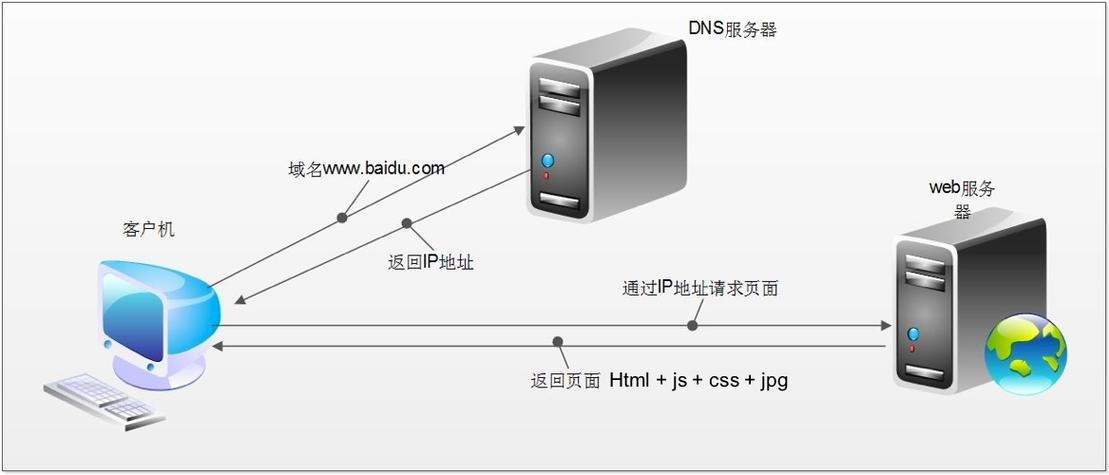
Imagine a web server is a restaurant.
- The Restaurant (Web Server): It has a single address (e.g.,
0.0.1:8000). It's always open, waiting for customers. - The Customers (Clients/Browsers): These are the users making requests (e.g., typing a URL into their browser).
- The Waiter (HTTP Handler): This is the most important part for our discussion. When a customer (client) makes a request, the waiter doesn't cook the food or manage the restaurant's finances. Instead, the waiter's job is to take the request, figure out what the customer wants, and pass it to the right "department" to be fulfilled.
- "Customer wants the menu?" -> Hand them a menu.
- "Customer wants to order the pasta?" -> Pass the order to the kitchen.
- "Customer wants to pay the bill?" -> Pass them to the cashier.
In Python, an HTTP handler is this "waiter." It's a piece of code that knows how to respond to a specific type of HTTP request (like a request for a specific URL path).
Core Concepts: The http.server Module
Python has a built-in module called http.server that makes it incredibly easy to create a basic web server. This module is perfect for learning, development, and serving simple files.
The key components we'll use are:
http.server.BaseHTTPRequestHandler: This is the handler class. You inherit from this class to create your own custom handler. It provides all the low-level methods for parsing the incoming request and building a response.do_GET: This is a method you override in your handler class. The server automatically calls this method whenever it receives an HTTPGETrequest.do_POST: Similarly, this method is called forPOSTrequests.self.send_response(code): Sends the HTTP status code back to the client (e.g.,200for OK,404for Not Found).self.send_header(keyword, value): Sends an HTTP header (e.g.,Content-Type: text/html).self.end_headers(): Signals that the headers are done. After this, you can send the actual content (the body of the response).self.wfile.write(data): Writes data to the response body. The data must be in bytes.
Example 1: A Simple "Hello, World!" Server
This is the most basic example. Our handler will only know how to respond to a GET request to the root path ().
# save this as my_server.py
from http.server import BaseHTTPRequestHandler, HTTPServer
import json
# We define a class that inherits from BaseHTTPRequestHandler
class SimpleHTTPRequestHandler(BaseHTTPRequestHandler):
    # This method is called for every GET request
    def do_GET(self):
        # 1. Send a 200 OK response
        self.send_response(200)
        # 2. Send headers
        # We're sending HTML content
        self.send_header('Content-type', 'text/html')
        self.end_headers()
        # 3. Send the response body (must be bytes)
        # We encode our string into bytes using UTF-8
        message = "Hello, World! This is a Python HTTP Server."
        self.wfile.write(message.encode('utf-8'))
# --- Server Setup ---
# Define the address and port the server will run on
# '' means listen on all available network interfaces
PORT = 8000
SERVER_ADDRESS = ('', PORT)
# Create an instance of the HTTPServer
# We pass it our server address and our custom handler class
httpd = HTTPServer(SERVER_ADDRESS, SimpleHTTPRequestHandler)
print(f"Starting server on port {PORT}...")
try:
    # The server will run forever until stopped (e.g., with Ctrl+C)
    httpd.serve_forever()
except KeyboardInterrupt:
    print("\nServer is shutting down.")
    httpd.server_close()
How to Run It:
- Save the code above as
my_server.py. - Open your terminal or command prompt.
- Navigate to the directory where you saved the file.
- Run the script:
python my_server.py - You'll see the output:
Starting server on port 8000... - Open your web browser and go to
http://localhost:8000. - You should see the message "Hello, World! This is a Python HTTP Server."
Example 2: Handling Different Paths and Returning JSON
A real handler needs to be smarter. It should look at the requested path (self.path) and decide what to do.
Let's create a handler that:
- Returns a JSON message for
/api/info. - Returns a "Not Found" error for any other path.
# save this as json_server.py
from http.server import BaseHTTPRequestHandler, HTTPServer
import json
class APIRequestHandler(BaseHTTPRequestHandler):
    def do_GET(self):
        # Check the requested path
        if self.path == '/api/info':
            # 1. Send a 200 OK response
            self.send_response(200)
            # 2. Send headers for JSON content
            self.send_header('Content-type', 'application/json')
            self.end_headers()
            # 3. Create a Python dictionary and convert it to a JSON string
            #    Then encode it to bytes
            response_data = {'message': 'Welcome to the API!', 'status': 'success'}
            json_response = json.dumps(response_data)
            self.wfile.write(json_response.encode('utf-8'))
        else:
            # Path not found
            self.send_response(404)
            self.send_header('Content-type', 'application/json')
            self.end_headers()
            error_data = {'error': 'Not Found', 'message': f'Path {self.path} does not exist.'}
            json_response = json.dumps(error_data)
            self.wfile.write(json_response.encode('utf-8'))
# --- Server Setup ---
PORT = 8000
SERVER_ADDRESS = ('', PORT)
httpd = HTTPServer(SERVER_ADDRESS, APIRequestHandler)
print(f"Starting JSON API server on port {PORT}...")
try:
    httpd.serve_forever()
except KeyboardInterrupt:
    print("\nServer is shutting down.")
    httpd.server_close()
How to Run and Test It:
- Save as
json_server.pyand run it withpython json_server.py. - Test the correct path:
- Open your browser to
http://localhost:8000/api/info. - You should see:
{"message": "Welcome to the API!", "status": "success"}
- Open your browser to
- Test the "Not Found" path:
- Open your browser to
http://localhost:8000/some/other/path. - You should see:
{"error": "Not Found", "message": "Path /some/other/path does not exist."}
- Open your browser to
Beyond the Basics: Using a Framework
While http.server is great for learning, it's not suitable for building complex, production-ready applications. It's single-threaded, lacks security features, and requires you to write a lot of boilerplate code.
For real-world applications, you use a web framework. These frameworks are built on top of Python's server capabilities and provide a much more powerful and organized way to handle HTTP requests.
Here are the most popular ones:
| Framework | Best For | Key Feature |
|---|---|---|
| Flask | Small to medium projects, APIs, rapid prototyping. | "Micro-framework". Simple, flexible, and easy to learn. |
| Django | Large, complex, data-driven websites (like social networks, e-commerce). | "Batteries-included". Comes with an admin panel, ORM, and security features. |
| FastAPI | High-performance APIs, modern applications. | Blazing fast (based on Starlette), automatic API documentation (Swagger UI). |
Example: The same "Hello, World" in Flask
Notice how much simpler and more declarative it is. You just define a "route" and a function to handle it.
# save as flask_app.py
from flask import Flask
# Create an instance of the Flask class
app = Flask(__name__)
# Define a route and the view function that handles it
# The @app.route decorator links a URL to a function
@app.route('/')
def hello_world():
    # The function's return value is automatically sent as the HTTP response
    return 'Hello, World! This is a Flask Server.'
# Run the app if this script is executed directly
if __name__ == '__main__':
    app.run(debug=True) # debug=True enables auto-reloading on changes
To run this, you first need to install Flask:
pip install flask
Then run the script:
python flask_app.py
And open http://localhost:5000 in your browser.
Summary
| Concept | http.server (Built-in) |
Web Frameworks (Flask, Django, etc.) |
|---|---|---|
| Purpose | Learning, simple file serving, development servers. | Building robust, scalable, production-ready web applications. |
| Handler | You create a class inheriting from BaseHTTPRequestHandler. |
You define functions or classes decorated with @app.route. |
| URL Routing | Manual if/elif checks on self.path. |
Declarative and powerful routing system. |
| Code | More boilerplate. | Concise and high-level. |
| Features | Minimal. | Includes ORM, templating, security, admin panels, etc. |
Start with the http.server module to understand the fundamentals. Then, move on to a framework like Flask or FastAPI for any serious project.