Of course! These three technologies form the backbone of countless enterprise applications, web services, and data-driven systems. Understanding how they work together is a fundamental skill for any developer or system administrator.
Let's break down each component and then see how they integrate.
Linux: The Operating System (The Foundation)
Think of Linux as the house where everything else lives. It's a free, open-source, and extremely stable operating system. It's the foundation that provides the environment for your Java application and your MySQL database to run on.
-
Why is it used?
- Stability & Reliability: Linux servers are known for running for years without needing a reboot.
- Security: Its permission model and open-source nature make it very secure and transparent.
- Cost: It's free to use and distribute.
- Performance: It's lightweight and highly efficient, making it ideal for servers.
- Control & Customization: You have complete control over every aspect of the system.
-
Key Concepts:
 (图片来源网络,侵删)
- Distributions (Distros): Different "flavors" of Linux, like Ubuntu (user-friendly), CentOS/RHEL (enterprise-focused), Debian (stable), and Arch (for enthusiasts).
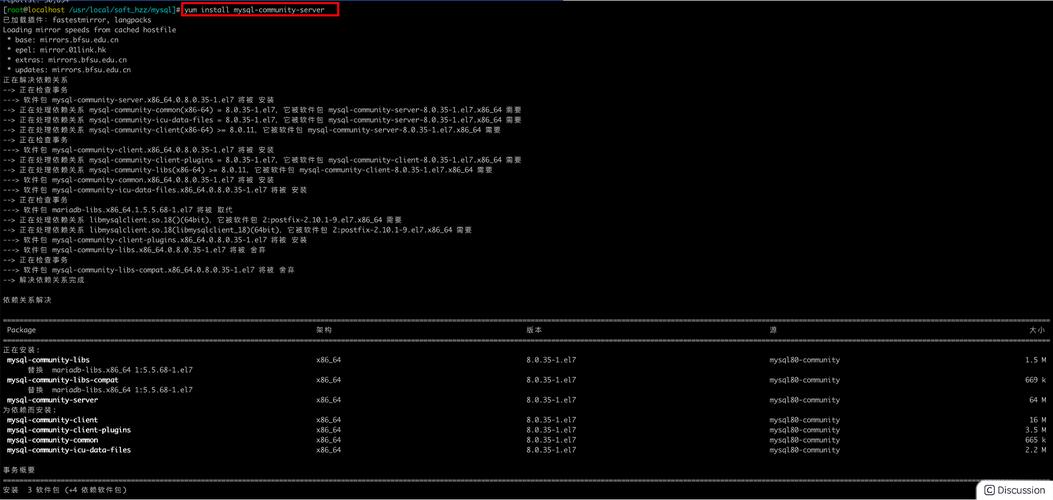
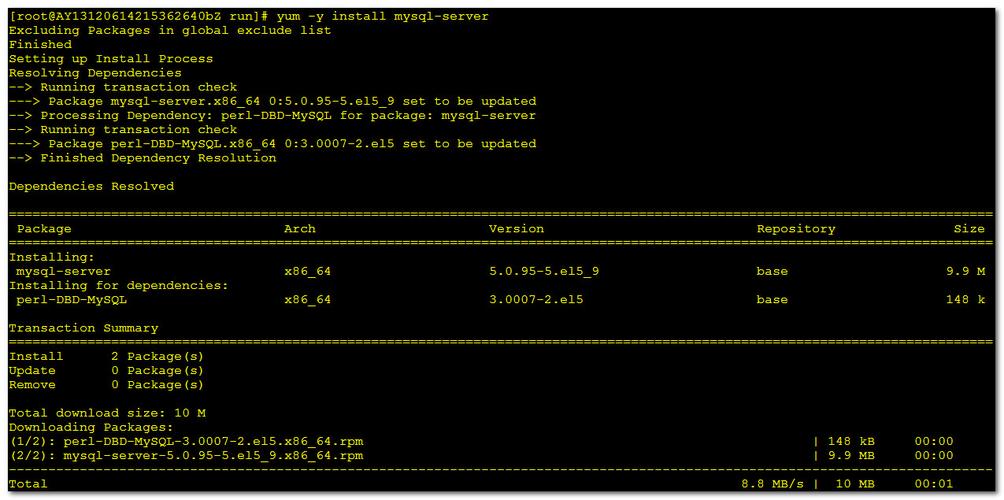
- Shell/Terminal: The command-line interface where you interact with the system using text commands (e.g.,
ls,cd,apt,yum). - Package Managers: Tools to install, update, and manage software.
apt(for Debian/Ubuntu) andyum/dnf(for CentOS/RHEL) are the most common.
Java: The Programming Language (The Builder & Worker)
Java is a high-level, class-based, object-oriented programming language. In our analogy, Java is the blueprint and the workers. It's used to build the application that will eventually use the database.
-
Why is it used?
- "Write Once, Run Anywhere" (WORA): This is Java's most famous feature. Java code is compiled into an intermediate format called "bytecode," which can run on any device that has a Java Virtual Machine (JVM). This makes it incredibly portable.
- Robust & Secure: It has strong memory management (garbage collection) and a strict type-checking system, which helps prevent common programming errors.
- Huge Ecosystem: Vast libraries and frameworks (like Spring Boot) are available to speed up development.
- Scalability: Excellent for building large, complex, and scalable enterprise applications.
-
Key Concepts:
- JDK (Java Development Kit): The software you need to write Java code. It includes the compiler (
javac), the JVM, and other tools. - JRE (Java Runtime Environment): The software you need to run Java code. It includes the JVM and core libraries. If you just want to run an app, you only need the JRE.
- JVM (Java Virtual Machine): The engine that executes Java bytecode. It's the magic that makes Java platform-independent.
- JDK (Java Development Kit): The software you need to write Java code. It includes the compiler (
MySQL: The Database (The Filing Cabinet)
MySQL is a world-leading open-source relational database management system (RDBMS). In our analogy, MySQL is the filing cabinet. It's responsible for storing, organizing, and retrieving the data for your Java application.
-
Why is it used?
- Relational Data: It stores data in tables with rows and columns, and defines relationships between them. This structure is perfect for organizing complex business data.
- ACID Compliance: It guarantees that transactions are processed reliably (Atomicity, Consistency, Isolation, Durability).
- Speed & Performance: It's highly optimized for fast read and write operations.
- Mature & Trusted: It's been around for decades and powers some of the biggest websites in the world, including Facebook, Twitter, and YouTube.
-
Key Concepts:
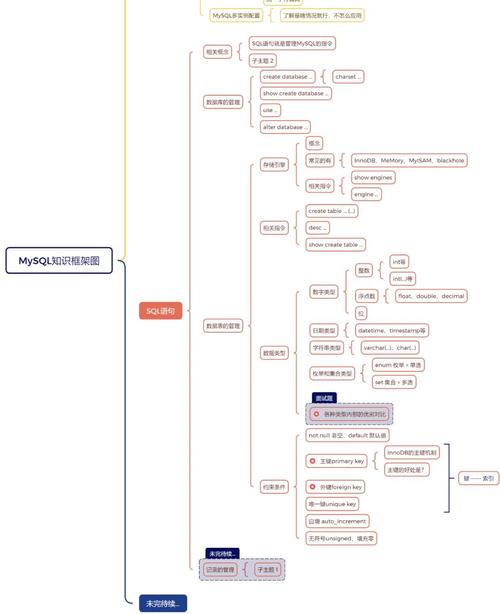
- SQL (Structured Query Language): The standard language for communicating with the database to perform tasks like querying, inserting, updating, and deleting data.
- Tables: The primary structure for storing data, similar to a spreadsheet.
- Schema: The blueprint of how the database is structured (which tables exist, what columns they have, data types, etc.).
The Big Picture: How They Work Together
This is where the magic happens. A typical web application flow looks like this:
- The Foundation: A server is running Linux.
- The Worker: A Java application (built with a framework like Spring Boot) is running on that Linux server. This application is the "brain" of your service.
- The Storage: A MySQL database is also running on the same server or (more commonly) on a separate, dedicated database server. Its job is to persist the application's data.
- The Connection: The Java application needs a way to talk to the MySQL database. This is done using a JDBC Driver.
- JDBC (Java Database Connectivity) is an API that allows Java applications to connect to and interact with a wide range of databases.
- You download the specific MySQL JDBC Driver (a
.jarfile) and include it in your Java project.
A Simplified Example:
Imagine a simple web page that shows a list of users.
- A user opens their web browser and goes to
your-app.com/users. - The request hits the Linux server.
- The Java application (running on a web server like Tomcat or embedded in Spring Boot) receives the request for the user list.
- The Java application executes code that says: "Get me all users from the database." It uses the MySQL JDBC Driver to translate this request into a standard SQL query.
- The query (
SELECT * FROM users;) is sent over the network to the MySQL database. - MySQL finds all the records in its
userstable and sends them back to the Java application. - The Java application receives the data, formats it into HTML (or JSON for a modern API), and sends the final web page back to the user's browser.
A Typical Workflow for a Developer
- On your Linux machine (or a VM):
- Install the JDK to write Java code.
- Install MySQL Server to have a database to connect to.
- In your Java Project (using an IDE like IntelliJ or Eclipse):
- Write the Java application logic.
- Add the MySQL JDBC Driver library to your project's dependencies.
- Connect and Test:
- In your Java code, you'll write connection strings to point to your MySQL database (e.g.,
jdbc:mysql://localhost:3306/my_database). - You'll provide credentials (username and password) for the database.
- You'll write SQL queries to create tables, insert data, and retrieve it.
- In your Java code, you'll write connection strings to point to your MySQL database (e.g.,
Essential Commands (Quick Reference)
| Task | Linux Shell | MySQL Shell (mysql -u root -p) |
|---|---|---|
| Install Software | sudo apt update && sudo apt install default-jdk mysql-server |
(N/A - Installation is OS-level) |
| Start/Stop Service | sudo systemctl start mysqlsudo systemctl stop mysql |
(N/A - Service is managed by OS) |
| Login to DB | (N/A) | mysql -u [username] -p |
| Show Databases | (N/A) | SHOW DATABASES; |
| Create DB | (N/A) | CREATE DATABASE my_app_db; |
| Use DB | (N/A) | USE my_app_db; |
| Create Table | (N/A) | CREATE TABLE users (id INT, name VARCHAR(100)); |
| Insert Data | (N/A) | INSERT INTO users VALUES (1, 'Alice'); |
| Select Data | (N/A) | SELECT * FROM users; |
| Exit | exit |
EXIT; |
Summary
| Component | Role | Analogy |
|---|---|---|
| Linux | Operating System | The house/foundation |
| Java | Application Logic | The builder/worker |
| MySQL | Data Storage | The filing cabinet |
| JDBC Driver | The Bridge | The communication channel |
Together, Linux, Java, and MySQL form a powerful, scalable, and cost-effective technology stack used to build robust, data-driven applications that run the modern world.