Of course! The Java String class is one of the most fundamental and widely used classes in the Java API. It's part of the java.lang package, so you don't need to import it explicitly.
Here’s a comprehensive guide to the Java String API, broken down into categories for clarity.
Core Concepts: String, StringBuilder, and StringBuffer
Before diving into methods, it's crucial to understand the difference between these three classes.
| Feature | String |
StringBuilder |
StringBuffer |
|---|---|---|---|
| Mutability | Immutable. Once created, its value cannot be changed. | Mutable. Can be modified after creation. | Mutable. Can be modified after creation. |
| Thread Safety | Thread-safe (as it's immutable). | Not thread-safe. | Thread-safe. Methods are synchronized. |
| Performance | Inefficient for frequent concatenation ( operator), as it creates a new object each time. | Fastest for non-threaded string manipulation. | Slower than StringBuilder due to synchronization overhead. |
| Primary Use Case | Storing fixed sequences of characters, like names, messages, or database keys. | Building strings in loops, or in any single-threaded context where performance is key. | Building strings in a multi-threaded environment where string state must be shared safely. |
Example of Immutability:
String s = "hello";
s.concat(" world"); // This does NOT change s
System.out.println(s); // Output: hello
// To change it, you must reassign
s = s.concat(" world");
System.out.println(s); // Output: hello world
Creating Strings
There are two ways to create a String object:
-
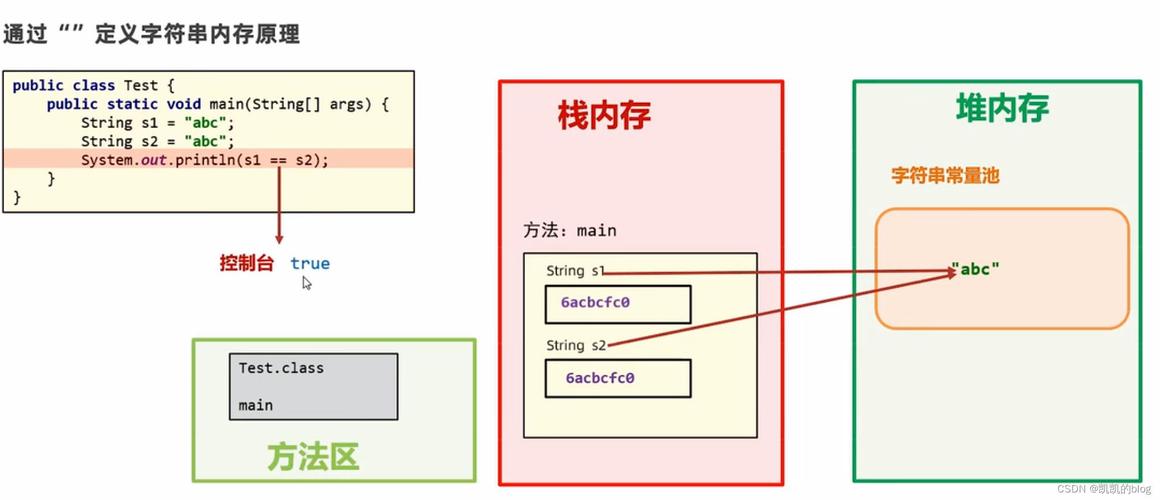
Using String Literals (Recommended): Java interns these strings, meaning identical literals point to the same object in memory.
String s1 = "Hello";
String s2 = "Hello"; // s1 and s2 point to the same object
-
Using the
newKeyword: This creates a new object in memory every time, even if the content is the same.String s3 = new String("Hello"); String s4 = new String("Hello"); // s3 and s4 are different objects
String API Methods (The Core)
Here are the most important methods, grouped by their function.
A. Basic Information & Inspection
| Method | Description | Example |
|---|---|---|
int length() |
Returns the length of the string. | "abc".length() -> 3 |
boolean isEmpty() |
Returns true if the string is empty (). |
"".isEmpty() -> true |
char charAt(int index) |
Returns the character at the specified index. | "Java".charAt(0) -> 'J' |
int codePointAt(int index) |
Returns the Unicode code point of the character at the given index. | "A".codePointAt(0) -> 65 |
boolean equals(Object anObject) |
Compares this string to the specified object for equality. | "java".equals("Java") -> false |
boolean equalsIgnoreCase(String anotherString) |
Compares this string to another, ignoring case differences. | "java".equalsIgnoreCase("Java") -> true |
int compareTo(String anotherString) |
Lexicographically compares two strings. Returns negative, zero, or positive. | "apple".compareTo("banana") -> -1 |
int compareToIgnoreCase(String str) |
Same as compareTo, but ignores case. |
"Apple".compareToIgnoreCase("apple") -> 0 |
B. Searching & Indexing
| Method | Description | Example |
|---|---|---|
boolean contains(CharSequence s) |
Returns true if the string contains the specified sequence of chars. |
"Hello World".contains("World") -> true |
int indexOf(int ch) |
Returns the index of the first occurrence of the character. | "hello".indexOf('e') -> 1 |
int indexOf(String str) |
Returns the index of the first occurrence of the substring. | "hello world".indexOf("world") -> 6 |
int lastIndexOf(int ch) |
Returns the index of the last occurrence of the character. | "hello".lastIndexOf('l') -> 3 |
boolean startsWith(String prefix) |
Tests if the string starts with the specified prefix. | "filename.txt".startsWith("file") -> true |
boolean endsWith(String suffix) |
Tests if the string ends with the specified suffix. | "filename.txt".endsWith(".txt") -> true |
C. Substrings & Extraction
| Method | Description | Example |
|---|---|---|
String substring(int beginIndex) |
Returns a substring from beginIndex to the end. |
"Hello World".substring(6) -> "World" |
String substring(int beginIndex, int endIndex) |
Returns a substring from beginIndex to endIndex (exclusive). |
"Hello World".substring(0, 5) -> "Hello" |
char[] toCharArray() |
Converts the string to a new character array. | "Java".toCharArray() -> ['J', 'a', 'v', 'a'] |
byte[] getBytes() |
Encodes the string into a sequence of bytes using the platform's default charset. | "Java".getBytes() -> [74, 97, 118, 97] |
D. Case Conversion
| Method | Description | Example |
|---|---|---|
String toUpperCase() |
Converts all characters in the string to uppercase. | "java".toUpperCase() -> "JAVA" |
String toLowerCase() |
Converts all characters in the string to lowercase. | "JAVA".toLowerCase() -> "java" |
E. Manipulation & Concatenation
| Method | Description | Example |
|---|---|---|
String concat(String str) |
Concatenates the specified string to the end of this string. | "Hello".concat(" World") -> "Hello World" |
String replace(char oldChar, char newChar) |
Replaces all occurrences of a character with another character. | "hello".replace('l', 'p') -> "heppo" |
String replace(CharSequence target, CharSequence replacement) |
Replaces all occurrences of a target sequence with a replacement sequence. | "I like apples".replace("apples", "oranges") -> "I like oranges" |
String trim() |
Removes leading and trailing whitespace. | " hello world ".trim() -> "hello world" |
F. Splitting & Joining
| Method | Description | Example |
|---|---|---|
String[] split(String regex) |
Splits the string around matches of the given regular expression. | "a,b,c".split(",") -> ["a", "b", "c"] |
static String join(CharSequence delimiter, CharSequence... elements) |
Joins the elements with the specified delimiter. | String.join("-", "2025", "10", "27") -> "2025-10-27" |
G. Advanced Methods
| Method | Description | Example |
|---|---|---|
String[] split(String regex, int limit) |
Splits the string with a limit on the number of resulting substrings. | "a,b,c,d".split(",", 2) -> ["a", "b,c,d"] |
String replaceFirst(String regex, String replacement) |
Replaces the first substring of this string that matches the given regular expression. | "foo foo foo".replaceFirst("foo", "bar") -> "bar foo foo" |
String replaceAll(String regex, String replacement) |
Replaces all substrings of this string that match the given regular expression. | "foo foo foo".replaceAll("foo", "bar") -> "bar bar bar" |
String format(String format, Object... args) |
Returns a formatted string using the specified format string and arguments. | String.format("Name: %s, Age: %d", "Alice", 30) -> "Name: Alice, Age: 30" |
String intern() |
Returns a canonical representation for the string object. It's an advanced method for memory optimization. | String s = new String("hello").intern(); |
StringBuilder and StringBuffer API
Their APIs are nearly identical. The key difference is thread safety (StringBuffer is synchronized).
| Method | Description | Example (StringBuilder) |
|---|---|---|
StringBuilder append(String str) |
Appends the specified string to this sequence. Modifies the object. | sb.append("Hello ").append("World!") |
StringBuilder insert(int offset, String str) |
Inserts the string at the specified position. | sb.insert(5, "Beautiful ") |
StringBuilder delete(int start, int end) |
Removes characters from start to end-1. |
sb.delete(0, 12) (removes "Hello Beautiful") |
StringBuilder reverse() |
Reverses the sequence of characters. | sb.reverse() |
String toString() |
Returns the string representation of the sequence. | sb.toString() |
Example:
StringBuilder sb = new StringBuilder();
sb.append("Hello");
sb.append(" ");
sb.append("World");
System.out.println(sb.toString()); // Output: Hello World
// More concise way:
StringBuilder sb2 = new StringBuilder("Hello");
sb2.append(" ").append("World");
System.out.println(sb2); // Output: Hello World (StringBuilder has its own toString)
String Pool (Interning)
When you create a string using a literal (String s = "hello"), Java checks a special area of memory called the String Pool. If an identical string already exists in the pool, it reuses that object instead of creating a new one.
String s1 = "hello"; // "hello" is added to the pool
String s2 = "hello"; // s2 is assigned the same reference from the pool
System.out.println(s1 == s2); // Output: true (they are the same object)
String s3 = new String("hello"); // A new object is created on the heap, regardless of the pool
System.out.println(s1 == s3); // Output: false (they are different objects)
// You can manually add a string to the pool using intern()
String s4 = new String("hello").intern();
System.out.println(s1 == s4); // Output: true
Best Practices
-
Use
Stringliterals for fixed text. -
Use
StringBuilderfor any string construction that happens in a loop or requires multiple modifications. -
Use
StringBufferonly when you absolutely need thread safety for string manipulation (which is rare). -
Avoid using for concatenation in loops. It's very inefficient.
// BAD
String s = "";
for (int i = 0; i < 1000; i++) {
    s = s + i; // Creates a new String object in every iteration!
}
// GOOD
StringBuilder sb = new StringBuilder();
for (int i = 0; i < 1000; i++) {
    sb.append(i); // Modifies the same StringBuilder object
}
String result = sb.toString();