Of course! Let's dive deep into Java's String class. It's one of the most fundamental and widely used classes in the Java language.
Here's a comprehensive guide covering everything from the basics to advanced topics.
What is a String in Java?
A String in Java is a sequence of characters. It's used to represent text. For example, "Hello, World!" is a string.
The String class is part of the java.lang package, which means you don't need to import it explicitly to use it.
Key Characteristics:
- Immutable: This is the single most important concept. Once a
Stringobject is created, its value cannot be changed. Any operation that appears to modify a string (like concatenation or replacing a character) actually creates a newStringobject. - Final: The
Stringclass is declared asfinal, which means it cannot be extended (you cannot create a subclass ofString). - Interned: Java maintains a special memory area called the "String Pool" or "Intern Pool" to optimize memory usage by storing unique string literals.
Creating Strings
There are two primary ways to create a string object.
a. Using String Literals
This is the most common and recommended way. When you use double quotes, Java first checks the String Pool. If an identical string already exists, it reuses that object. Otherwise, it creates a new one in the pool.
String greeting = "Hello, World!";
String name = "Alice";
b. Using the new Keyword
This explicitly creates a new String object in the regular (heap) memory, regardless of whether an identical string already exists in the pool. This is generally less efficient.
String greeting = new String("Hello, World!");
Example to Illustrate Immutability:

String original = "Java";
System.out.println("Original: " + original); // Output: Original: Java
// The toUpperCase() method does NOT change the original string.
// It returns a NEW string object.
String modified = original.toUpperCase();
System.out.println("Original after modification: " + original); // Output: Original after modification: Java
System.out.println("Modified: " + modified);                    // Output: Modified: JAVA
Common String Methods
The String class provides a rich set of methods for manipulation. Here are the most frequently used ones.
Length and Checking
| Method | Description | Example |
|---|---|---|
length() |
Returns the number of characters in the string. | "Java".length() returns 4. |
isEmpty() |
Returns true if the string is empty (), otherwise false. |
"".isEmpty() returns true. |
isBlank() |
Returns true if the string is empty or contains only whitespace. |
" ".isBlank() returns true. (Java 11+) |
Accessing Characters
| Method | Description | Example |
|---|---|---|
charAt(int index) |
Returns the character at the specified index. | "Java".charAt(0) returns 'J'. |
substring(int beginIndex) |
Returns a substring from the specified index to the end. | "Java".substring(1) returns "ava". |
substring(int beginIndex, int endIndex) |
Returns a substring from beginIndex (inclusive) to endIndex (exclusive). |
"Java".substring(1, 3) returns "av". |
Searching
| Method | Description | Example |
|---|---|---|
contains(CharSequence s) |
Returns true if the string contains the specified sequence. |
"Java".contains("av") returns true. |
indexOf(String str) |
Returns the index of the first occurrence of str. Returns -1 if not found. |
"Java".indexOf("a") returns 1. |
lastIndexOf(String str) |
Returns the index of the last occurrence of str. |
"Java".lastIndexOf("a") returns 3. |
startsWith(String prefix) |
Returns true if the string starts with the specified prefix. |
"Java".startsWith("Ja") returns true. |
endsWith(String suffix) |
Returns true if the string ends with the specified suffix. |
"Java".endsWith("va") returns true. |
Comparison
Important: Use equals() for content comparison, not .
| Method | Description | Example |
|---|---|---|
equals(Object anObject) |
Compares the content of two strings for equality. Case-sensitive. | "Java".equals("java") returns false. |
equalsIgnoreCase(String anotherString) |
Compares content, ignoring case differences. | "Java".equalsIgnoreCase("java") returns true. |
compareTo(String anotherString) |
Compares lexicographically (dictionary order). Returns negative, zero, or positive. | "Apple".compareTo("Banana") returns a negative number. |
regionMatches(...) |
Checks if a specified region of one string matches a region of another. | Useful for complex comparisons. |
Case Conversion
| Method | Description | Example |
|---|---|---|
toUpperCase() |
Converts all characters to uppercase. | "java".toUpperCase() returns "JAVA". |
toLowerCase() |
Converts all characters to lowercase. | "JAVA".toLowerCase() returns "java". |
Trimming and Replacing
| Method | Description | Example |
|---|---|---|
trim() |
Removes leading and trailing whitespace. | " Java ".trim() returns "Java". |
replace(char oldChar, char newChar) |
Replaces all occurrences of a character. | "Java".replace('a', 'o') returns "Jovo". |
replace(CharSequence target, CharSequence replacement) |
Replaces all occurrences of a sequence. | "Java".replace("av", "oo") returns "Jooa". |
replaceAll(String regex, String replacement) |
Replaces all substrings that match a regular expression. | "123-456-7890".replaceAll("\\d", "X") returns "XXX-XXX-XXXX". |
Splitting and Joining
| Method | Description | Example |
|---|---|---|
split(String regex) |
Splits the string into an array of substrings based on a regular expression. | "a,b,c".split(",") returns ["a", "b", "c"]. |
join(CharSequence delimiter, CharSequence... elements) |
Joins elements with a delimiter. (Static method) | String.join("-", "2025", "10", "27") returns "2025-10-27". |
String Concatenation
You can join strings using the operator or the concat() method.
String firstName = "John";
String lastName = "Doe";
// Using the + operator (most common)
String fullName1 = firstName + " " + lastName; // "John Doe"
// Using the concat() method
String fullName2 = firstName.concat(" ").concat(lastName); // "John Doe"
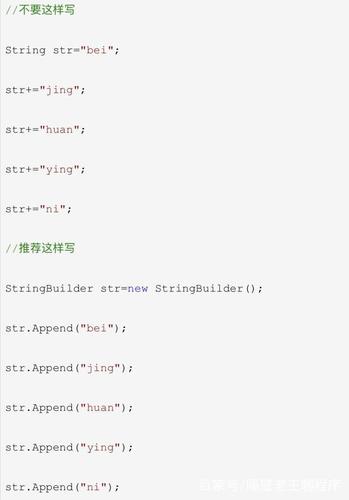
// Important: Be careful with loops!
// In a loop, repeated concatenation with '+' creates many intermediate objects.
// Use StringBuilder for loops.
StringBuilder and StringBuffer (For Mutable Strings)
Because String is immutable, performing many modifications (like in a loop) can be inefficient, as it creates a new object for each modification. This is where StringBuilder and StringBuffer come in.
They are mutable (their content can be changed) and are designed for string manipulation.
| Feature | StringBuilder |
StringBuffer |
|---|---|---|
| Mutability | Mutable | Mutable |
| Thread Safety | Not thread-safe (faster) | Thread-safe (slower, due to synchronization) |
| Performance | Generally faster | Generally slower |
| When to use | In single-threaded environments (most common cases) | In multi-threaded environments where shared string data is modified |
Example with StringBuilder:
// Efficient way to build a string in a loop
StringBuilder sb = new StringBuilder();
for (int i = 1; i <= 5; i++) {
    sb.append("Number: ").append(i).append("\n");
}
String result = sb.toString();
System.out.println(result);
String.format() and printf() (Formatted Strings)
For creating formatted strings, similar to printf in C, Java provides String.format().
String name = "Alice";
int score = 95;
char grade = 'A';
// Using String.format()
String message = String.format("Student: %s, Score: %d, Grade: %c", name, score, grade);
System.out.println(message); // Output: Student: Alice, Score: 95, Grade: A
// Using System.out.printf (prints directly to the console)
System.out.printf("Student: %s, Score: %d, Grade: %c%n", name, score, grade);
// %n is a platform-independent newline character.
Common Format Specifiers:
%s: String%d: Decimal integer%f: Floating-point number%c: Character%b: Boolean- : A literal percent sign
String Pool (Interning)
The String Pool is a special memory area in the Java Heap. It helps to save memory by storing only one copy of each distinct string literal.
// Both s1 and s2 will point to the SAME object in the String Pool.
String s1 = "hello";
String s2 = "hello";
System.out.println(s1 == s2); // Output: true (because they reference the same object)
// s3 is created with 'new', so it's a NEW object in the heap, not in the pool.
String s3 = new String("hello");
System.out.println(s1 == s3); // Output: false (because they are different objects)
// You can explicitly add a string to the pool using .intern()
String s4 = new String("hello").intern();
System.out.println(s1 == s4); // Output: true
Best Practice: Always use string literals () unless you have a specific reason to use new String(...).