Of course! This is a fundamental concept in Python, especially when dealing with text. Let's break down the relationship between Unicode, integers, and Python.
The Core Idea: The Unicode Code Point
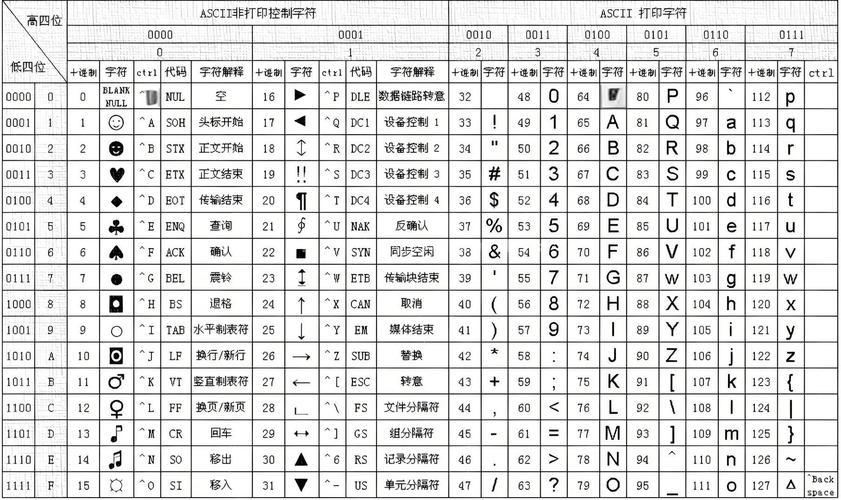
At its heart, every character you see on your screen—every letter, symbol, emoji, and even invisible control characters—is represented by a unique number in a standard called Unicode.
- This unique number is called a code point.
- Code points are typically written in hexadecimal, prefixed with
U+. - For example:
Ahas the code pointU+0041.- (Euro sign) has the code point
U+20AC. - (Face with Tears of Joy emoji) has the code point
U+1F602.
In Python, there are two main ways to work with this relationship: using the ord() and chr() built-in functions.
ord() (Character to Integer)
The ord() function takes a single Unicode character (a string of length 1) and returns its corresponding integer code point.
Syntax:
ord(character)
Examples:
# Get the integer for 'A'
code_point_a = ord('A')
print(f"The integer for 'A' is: {code_point_a}")
# Output: The integer for 'A' is: 65
# Get the integer for the Euro sign
code_point_euro = ord('€')
print(f"The integer for '€' is: {code_point_euro}")
# Output: The integer for '€' is: 8364
# Get the integer for the skull emoji
code_point_skull = ord('💀')
print(f"The integer for '💀' is: {code_point_skull}")
# Output: The integer for '💀' is: 128128
This is how you convert a character into its underlying integer representation.
chr() (Integer to Character)
The chr() function does the exact opposite of ord(). It takes an integer (a valid Unicode code point) and returns the corresponding character.
Syntax:
chr(integer_code_point)
Examples:
# Get the character for integer 65
char_from_65 = chr(65)
print(f"The character for 65 is: '{char_from_65}'")
# Output: The character for 65 is: 'A'
# Get the character for integer 8364 (Euro sign)
char_from_8364 = chr(8364)
print(f"The character for 8364 is: '{char_from_8364}'")
# Output: The character for 8364 is: '€'
# Get the character for integer 128128 (Skull emoji)
char_from_128128 = chr(128128)
print(f"The character for 128128 is: '{char_from_128128}'")
# Output: The character for 128128 is: '💀'
Practical Examples and Use Cases
Understanding this conversion is crucial for many tasks.
Example 1: Generating the Alphabet
You can generate the lowercase alphabet by iterating over a range of integers and converting them to characters.
# The code points for 'a' to 'z' are 97 to 122
alphabet = [chr(i) for i in range(97, 123)]
print(alphabet)
# Output: ['a', 'b', 'c', 'd', 'e', 'f', 'g', 'h', 'i', 'j', 'k', 'l', 'm', 'n', 'o', 'p', 'q', 'r', 's', 't', 'u', 'v', 'w', 'x', 'y', 'z']
# You can do the same for uppercase
uppercase_alphabet = [chr(i) for i in range(65, 91)]
print(uppercase_alphabet)
# Output: ['A', 'B', 'C', 'D', 'E', 'F', 'G', 'H', 'I', 'J', 'K', 'L', 'M', 'N', 'O', 'P', 'Q', 'R', 'S', 'T', 'U', 'V', 'W', 'X', 'Y', 'Z']
Example 2: Checking if a Character is a Letter or Digit
You can use the integer code points to determine the category of a character.
def check_char_properties(c):
    code = ord(c)
    print(f"Character: '{c}', Code Point: {code}")
    # Basic Latin letters (A-Z, a-z)
    if (65 <= code <= 90) or (97 <= code <= 122):
        print("  -> This is an alphabet letter.")
    # Digits (0-9)
    elif 48 <= code <= 57:
        print("  -> This is a digit.")
    # Check for a space
    elif code == 32:
        print("  -> This is a space.")
    else:
        print("  -> This is another symbol (like punctuation or emoji).")
check_char_properties('H')
check_char_properties('7')
check_char_properties(' ')
check_char_properties('😊')
Example 3: Caesar Cipher (A Simple Encryption)
A Caesar cipher works by shifting each letter by a fixed number of positions in the alphabet. This is a perfect use case for ord() and chr().
def caesar_cipher(text, shift):
    result = ""
    for char in text:
        # Handle uppercase letters
        if char.isupper():
            code_point = ord(char)
            # Shift the code point, wrapping around from Z to A
            new_code_point = (code_point - 65 + shift) % 26 + 65
            result += chr(new_code_point)
        # Handle lowercase letters
        elif char.islower():
            code_point = ord(char)
            new_code_point = (code_point - 97 + shift) % 26 + 97
            result += chr(new_code_point)
        # Leave other characters (like spaces, punctuation) unchanged
        else:
            result += char
    return result
original_text = "Hello, World!"
shift_amount = 3
encrypted_text = caesar_cipher(original_text, shift_amount)
decrypted_text = caesar_cipher(encrypted_text, -shift_amount)
print(f"Original:  {original_text}")
print(f"Encrypted: {encrypted_text}")
print(f"Decrypted: {decrypted_text}")
Important: ord() vs. len()
A common point of confusion is the difference between ord() and len().
ord()gives you the integer value of a single character.len()gives you the number of characters in a string.
my_string = "😊A"
# len() counts the number of characters (graphemes)
print(f"The string has {len(my_string)} characters.")
# Output: The string has 2 characters. (The emoji is one, 'A' is the second)
# ord() gives the integer value for ONE character
print(f"The integer for the first character '{my_string[0]}' is: {ord(my_string[0])}")
# Output: The integer for the first character '😊' is: 128522
print(f"The integer for the second character '{my_string[1]}' is: {ord(my_string[1])}")
# Output: The integer for the second character 'A' is: 65
Summary Table
| Function | Input | Output | Description |
|---|---|---|---|
ord() |
A single character (string of length 1) | An integer (the Unicode code point) | Converts a character to its integer representation. |
chr() |
An integer (a valid Unicode code point) | A single character (string of length 1) | Converts an integer to its corresponding character. |
This int <-> char mapping is the bedrock of how Python handles text internally, allowing it to work with the entire spectrum of human language and symbols defined by the Unicode standard.