Of course! Here is a comprehensive guide to using Java with an Oracle database via JDBC, covering everything from setup to best practices.
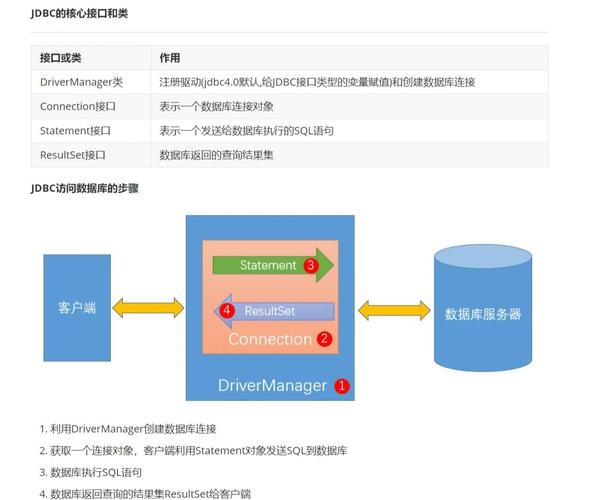
What is JDBC?
JDBC (Java Database Connectivity) is the standard Java API for connecting to and interacting with databases. It provides a set of interfaces and classes that allow you to execute SQL queries and update data in a database. Oracle provides its own implementation of these interfaces, known as a JDBC Driver.
Prerequisites: The Oracle JDBC Driver
Before you can connect, you need the Oracle JDBC driver JAR file. The driver is a bridge between your Java application and the Oracle database.
Which Driver to Use? (ojdbc vs. ucp)
Oracle provides two main driver types for connecting to a database:
-
ojdbc(Oracle JDBC Driver): This is the traditional, well-established driver. It's robust and has been the standard for years. For most applications, this is the right choice. (图片来源网络,侵删)
- URL Format:
jdbc:oracle:thin:@<host>:<port>:<service_name> thin: This indicates a "thin" driver, which is a pure Java implementation that doesn't require an Oracle client installation on the machine running the Java code.
- URL Format:
-
ucp(Universal Connection Pool): This is a more modern driver that includes a high-performance connection pooling feature built-in. It's designed for applications that require high scalability and performance.- URL Format:
jdbc:oracle:ucp:@<host>:<port>:<service_name> - For most new projects, starting with
ucpis a good idea, especially if you anticipate high traffic.
- URL Format:
For this guide, we'll focus on the classic ojdbc8.jar (or ojdbc11.jar for newer Java versions) as it's the most universally understood.
How to Get the Driver
The easiest way to manage dependencies is with a build tool like Maven or Gradle.
Using Maven:
Add this dependency to your pom.xml file. Choose the appropriate version for your Oracle DB and Java version.
<!-- For Oracle Database 19c and Java 8 -->
<dependency>
    <groupId>com.oracle.database.jdbc</groupId>
    <artifactId>ojdbc8</artifactId>
    <version>19.3.0.0</version>
</dependency>
<!-- For Oracle Database 21c and Java 11+ -->
<dependency>
    <groupId>com.oracle.database.jdbc</groupId>
    <artifactId>ojdbc11</artifactId>
    <version>21.5.0.0</version>
</dependency>
Manual Download:
You can also download the JAR file directly from the Oracle Maven Repository or the Oracle Technology Network.
Establishing a Connection
The first step in any JDBC operation is to get a Connection object. This object represents a single session with the database.
Key Components:
- Driver Class:
oracle.jdbc.OracleDriver - Connection URL:
jdbc:oracle:thin:@<host>:<port>:<service_name><host>: The hostname or IP address of your database server.<port>: The port number (default is1521).<service_name>: The service name of your Oracle database instance.
- Username & Password: Your database credentials.
Example Code:
import java.sql.Connection;
import java.sql.DriverManager;
import java.sql.SQLException;
public class OracleConnectionExample {
    // Database connection details
    private static final String DB_URL = "jdbc:oracle:thin:@myoraclehost.example.com:1521/ORCLPDB1";
    private static final String USER = "your_username";
    private static final String PASS = "your_password";
    public static void main(String[] args) {
        // The try-with-resources statement ensures the connection is closed automatically.
        try (Connection conn = DriverManager.getConnection(DB_URL, USER, PASS)) {
            if (conn != null) {
                System.out.println("Connected to the Oracle database successfully!");
                // You can now use the 'conn' object to create statements, etc.
            }
        } catch (SQLException e) {
            System.err.println("Connection failed!");
            e.printStackTrace();
        }
    }
}
Important: The try-with-resources statement is the modern, recommended way to handle resources like connections. It guarantees that the close() method is called on the Connection object, even if an exception occurs, preventing resource leaks.
Executing a Query (SELECT Statement)
Once you have a connection, you can execute a SQL query. The process involves:
- Creating a
StatementorPreparedStatementobject. - Executing the query, which returns a
ResultSet. - Iterating through the
ResultSetto process the data.
Using Statement (for static queries)
Statement is used for executing simple SQL queries that do not change.
import java.sql.*;
public class SelectExample {
    private static final String DB_URL = "jdbc:oracle:thin:@myoraclehost.example.com:1521/ORCLPDB1";
    private static final String USER = "your_username";
    private static final String PASS = "your_password";
    public static void main(String[] args) {
        String sql = "SELECT employee_id, first_name, last_name FROM employees WHERE department_id = 10";
        try (Connection conn = DriverManager.getConnection(DB_URL, USER, PASS);
             Statement stmt = conn.createStatement();
             ResultSet rs = stmt.executeQuery(sql)) {
            System.out.println("Employees in Department 10:");
            // Loop through the result set
            while (rs.next()) {
                // Retrieve by column name is safer and more readable
                int id = rs.getInt("employee_id");
                String firstName = rs.getString("first_name");
                String lastName = rs.getString("last_name");
                System.out.println("ID: " + id + ", Name: " + firstName + " " + lastName);
            }
        } catch (SQLException e) {
            e.printStackTrace();
        }
    }
}
Using PreparedStatement (HIGHLY RECOMMENDED)
PreparedStatement is used for executing pre-compiled SQL statements. It is essential for security and performance.
- Security: It prevents SQL Injection attacks by separating SQL logic from data.
- Performance: The database can cache the execution plan for the statement, making subsequent executions faster.
Use as placeholders for parameters.
import java.sql.*;
public class PreparedStatementExample {
    private static final String DB_URL = "jdbc:oracle:thin:@myoraclehost.example.com:1521/ORCLPDB1";
    private static final String USER = "your_username";
    private static final String PASS = "your_password";
    public static void main(String[] args) {
        // SQL with a placeholder for the department ID
        String sql = "SELECT employee_id, first_name, last_name FROM employees WHERE department_id = ?";
        try (Connection conn = DriverManager.getConnection(DB_URL, USER, PASS);
             // Create a PreparedStatement
             PreparedStatement pstmt = conn.prepareStatement(sql)) {
            // Set the value for the first placeholder (?)
            pstmt.setInt(1, 20); // 20 is the department_id we are searching for
            // Execute the query
            try (ResultSet rs = pstmt.executeQuery()) {
                System.out.println("Employees in Department 20:");
                while (rs.next()) {
                    int id = rs.getInt("employee_id");
                    String firstName = rs.getString("first_name");
                    String lastName = rs.getString("last_name");
                    System.out.println("ID: " + id + ", Name: " + firstName + " " + lastName);
                }
            }
        } catch (SQLException e) {
            e.printStackTrace();
        }
    }
}
Executing an Update (INSERT, UPDATE, DELETE)
For data manipulation statements (DML), you use executeUpdate(). This method returns an integer representing the number of rows affected.
import java.sql.*;
public class UpdateExample {
    private static final String DB_URL = "jdbc:oracle:thin:@myoraclehost.example.com:1521/ORCLPDB1";
    private static final String USER = "your_username";
    private static final String PASS = "your_password";
    public static void main(String[] args) {
        // SQL to update an employee's salary
        String sql = "UPDATE employees SET salary = salary * 1.10 WHERE employee_id = ?";
        try (Connection conn = DriverManager.getConnection(DB_URL, USER, PASS);
             PreparedStatement pstmt = conn.prepareStatement(sql)) {
            // Set the employee_id for the WHERE clause
            pstmt.setInt(1, 101); // Employee ID to update
            // Execute the update
            int rowsAffected = pstmt.executeUpdate();
            System.out.println(rowsAffected + " row(s) updated successfully.");
        } catch (SQLException e) {
            e.printStackTrace();
        }
    }
}
Best Practices
-
Use Connection Pooling: Creating a new database connection for every request is very expensive. Use a connection pool (like HikariCP, Apache DBCP, or the Oracle UCP) to reuse existing connections. This is the single most important performance optimization.
-
HikariCP Example:
<!-- Add to pom.xml -->
<dependency>
    <groupId>com.zaxxer</groupId>
    <artifactId>HikariCP</artifactId>
    <version>5.0.1</version>
</dependency>
import com.zaxxer.hikari.HikariConfig; import com.zaxxer.hikari.HikariDataSource; import java.sql.Connection; import java.sql.SQLException; public class HikariCPExample { private static HikariDataSource dataSource; static { HikariConfig config = new HikariConfig(); config.setJdbcUrl("jdbc:oracle:thin:@myoraclehost.example.com:1521/ORCLPDB1"); config.setUsername("your_username"); config.setPassword("your_password"); config.setDriverClassName("oracle.jdbc.OracleDriver"); // Pool settings config.setMaximumPoolSize(10); dataSource = new HikariDataSource(config); } public static Connection getConnection() throws SQLException { return dataSource.getConnection(); } public static void main(String[] args) { try (Connection conn = getConnection()) { System.out.println("Got a connection from the pool!"); } catch (SQLException e) { e.printStackTrace(); } } }
-
-
Always Use
PreparedStatement: As mentioned, it's crucial for security and performance. Never use string concatenation to build SQL queries. -
Close Resources: Always close
Connection,Statement, andResultSetobjects in afinallyblock or, preferably, usetry-with-resourcesto ensure they are closed automatically. -
Handle Exceptions Gracefully: Catch
SQLExceptionand provide meaningful error messages or log them. Don't just print the stack trace in a production environment. -
Use
ResultSetby Column Name:rs.getString("first_name")is safer and more robust thanrs.getString(2). If the column order changes in the SQL query, your code won't break. -
Transactions: For operations that require multiple steps to succeed or fail together (e.g., transferring money), use transactions.
conn.setAutoCommit(false); // Start transaction
try {
    // Execute multiple update statements
    stmt1.executeUpdate();
    stmt2.executeUpdate();
    conn.commit(); // Commit transaction if all is well
} catch (SQLException e) {
    conn.rollback(); // Roll back on failure
    e.printStackTrace();
}